Find a client and read their record
Search by name, phone or card, scan a client card, and understand everything on a client record.
Who can do this: Everyone
Search for a client
On the Clients screen, type in Search clients. The list updates as you type. You can search by:
- any part of their first or last name
- any part of their phone number
- their card number
- the start of both names, for example jo sm finds Jo Smith
The list shows up to 200 matches, sorted by last name. Suspended clients have a red Suspended badge.
Scan a client card
In the Diary, click into Scan client card… and scan their card or fob. TanEngine shows their name and minutes, and opens their record.
- “No client found with that card” means the card isn’t on anyone’s record yet. Find the client and add the number with Edit.
- If the client is suspended, you’ll see the Account suspended message instead.
You can also scan a card into the Clients search box, or into Attach client on the till.
What’s on a client record
Click a client in the list to open their record on the right.
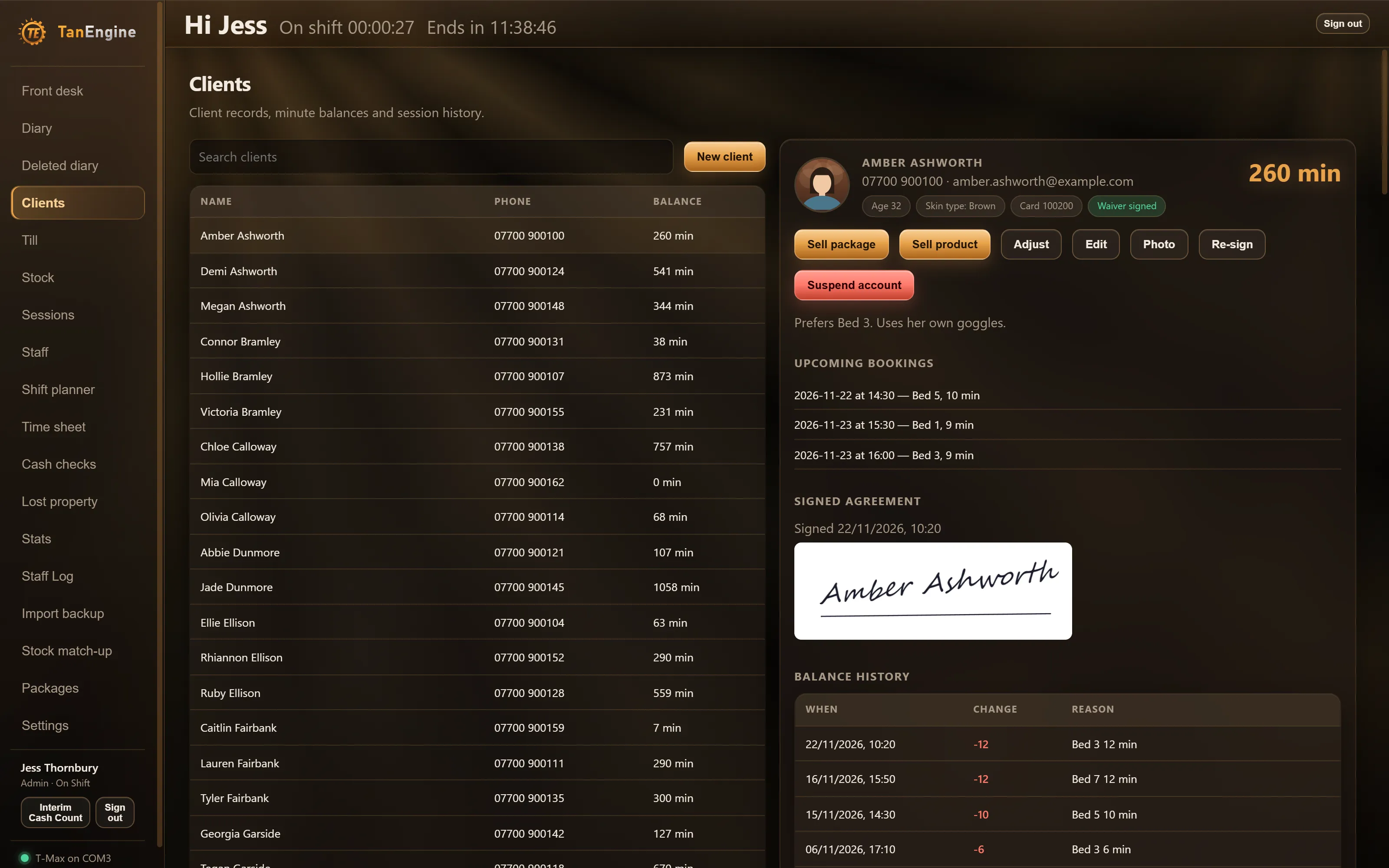
At the top: their name and contact details, then badges for their age (or No DOB), skin type, card number and whether the waiver is signed. Their minute balance is on the right.
Buttons:
| Button | What it does |
|---|---|
| Sell package / Sell product | Sell minutes or products to this client. See Sell minutes and products. |
| Adjust | Add or take away minutes by hand (owners and managers). See Minutes and balances. |
| Edit | Change their details. |
| Photo | Add or replace their photo. |
| Sign waiver / Re-sign | Capture their signature on screen. |
| Suspend account | Stop them booking or tanning, with a reason. |
Further down: your notes, Upcoming bookings, their Signed agreement, the Balance history (every minute bought and used) and their recent Sessions. The balance history and sessions show the latest 50 of each.
Tip: For a fuller picture, including every visit, every payment and a running minute balance, open the client from a booking and choose View account. See Book a session.
Screenshots show a demo salon. All client names and details are fictional.